Rapanta, C., Botturi, L., Goodyear, P. et al. Online University Teaching During and After the Covid-19 Crisis: Refocusing Teacher Presence and Learning Activity. Postdigit Sci Educ (2020). https://doi.org/10.1007/s42438-020-00155-y
Abstract The Covid-19 pandemic has raised significant challenges for the higher education community worldwide. A particular challenge has been the urgent and unexpected request for previously face-to-face university courses to be taught online. Online teaching and learning imply a certain pedagogical content knowledge (PCK), mainly related to designing and organising for better learning experiences and creating distinctive learning environments, with the help of digital technologies. With this article, we provide some expert insights into this online-learning-related PCK, with the goal of helping non-expert university teachers (i.e. those who have little experience with online learning) to navigate in these challenging times. Our findings point at the design of learning activities with certain characteristics, the combination of three types of presence (social, cognitive and facilitatory) and the need for adapting assessment to the new learning requirements. We end with a reflection on how responding to a crisis (as best we can) may precipitate enhanced teaching and learning practices in the postdigital era.
So, we just published this article alongside some amazing scholars around the world. The process of writing the article was very interesting. We all shared our ideas on the key questions:
The five questions were as follows:
In what aspects do you think online learning design and delivery is different than face-to-face teaching and learning?
What do you think makes online teaching and learning successful?
What would you say to non-expert colleagues who follow a materials-based approach to online teaching, e.g. sharing materials with students or asking them to produce materials?
What would you say to colleagues who follow a tools-based approach to online teaching, i.e. the idea that tools such as videoconferencing or text-based discussion boards are the key features of online learning?
What are some effective ways of monitoring students’ engagement and learning during online courses? How can they inform assessment?
What are your thoughts on teaching during the pandemic? Feel free to post your thoughts in the comments field.
I stumbled upon this interesting tool just this morning. Connected Papers allows researchers to see how a paper is related to other papers that have been published. It’s not a means of seeing who has cited the paper, but to see works with similar references.
Again, the papers that appear do not necessarily cite each other, but they discuss similar information and cite similar references.
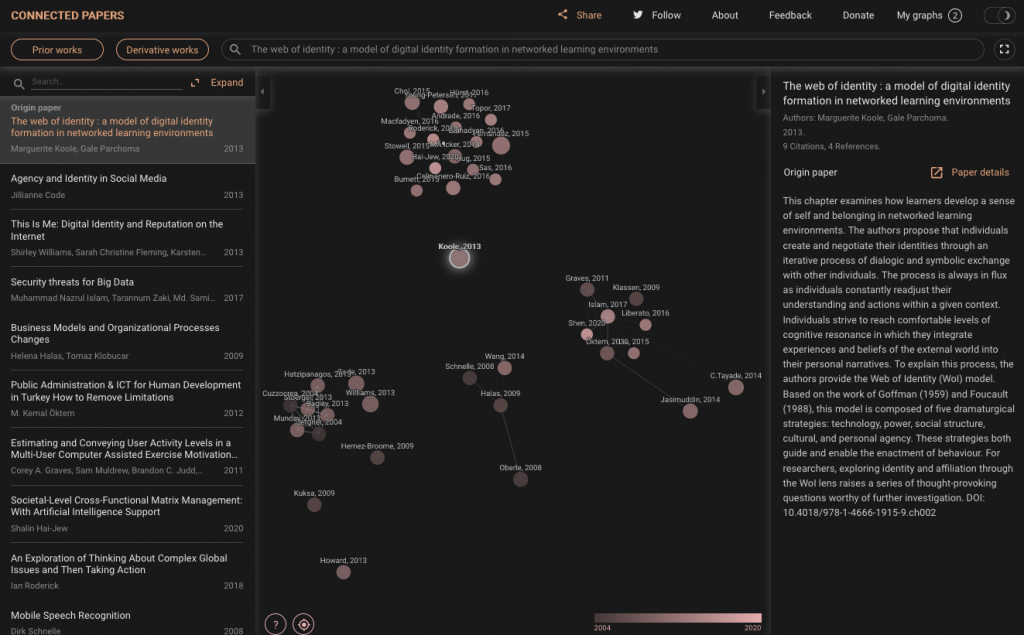
I thought I’d try another paper, and the results raise some questions: The web of identity: A model of digital identity formation in networked learning environments. In this case, my paper appears to be unconnected to other clusters around it–even though they all seem to be about related topics such as identity, community of practice, educational technology, etc.:
As per the Connected Papers website, this tool may be useful if scoping out newer fields of study such as artificial intelligence (AI), augmented reality (AR), or virtual reality (VR) in education.
Related: Project Alexandria
Another site that documents similarities between authors and creates maps is Project Alexandria. It also offers a “sentiment analysis” tool (see the “about” information on the site. To test this, I used:
Title: Mobile Learning Author: Mohamed Ally Description: This collection is for anyone interested in the use of mobile technology for various distance learning applications. Readers will discover how to design learning materials for delivery on mobile technology…
I was just working with a student today, and it seemed appropriate to discuss the levels of theory. (Ghads! I posted this yesterday, and noted some serious revisions were needed!)
Theoretical perspective (anti-positivist vs. positivist).
Background theory (of your field such as distance education).
Focal theory (for example, maybe you are using the community of inquiry to guide your study).
Data theory (the methods you choose, how you collect your data, and how you analyze your data).
They are all connected.
You will need to understand where you are in terms of your philosophical approach to the world:
Ontology: What is reality? The nature of the social phenomenon/a you are studying.
Subjectivist: nominalist, idealist, relativist.
Objectivist: realist; there is an underlying reality.
Epistemology: How can we come to know reality? (i.e., objectivism, subjectivism, etc.).
Subjectivist: There is a world, but it is understood differently by different people (relativist); or, reality is socially constructed (nominalist; social constructionist).
Objectivist: The underlying reality can be observed.
For example, if I identify myself to be within the subjectivist camp:
I will likely position myself with the anti-positivist theoretical perspective. I might choose:
Social constructionism (i.e., the social construction of reality),
Critical theory,
Feminist theory,
Post-modernism, etc.
Say, I select “interpretivism,” I am likely to draw upon some of the following [note that these will help you form your research questions (RQs)]:
Phenomenology (RQ: What is the lived, pre-reflective experience of adult learners when they start an online class?)
Ethnography (RQ: What are the characteristics of older adults who take online classes?)
Case study (RQ: What learning strategies are used by adults in 1) online learning for a photography class and 2) an art appreciation class?)
Grounded theory (RQ: What are the attitudes of elderly people who use mobile devices for online shopping?)
Narrative (RQ: How does an adult learner experience his/her first online class?)
The background theory of, for example, distance education would involve
A conceptualization of what distance education is. What are the inclusion and exclusion criteria?
The history of distance education.
Characteristics of distance education.
What does ‘teaching’ mean within the context of distance education?
What does ‘learning’ mean within the context of distance education?
What are the processes involved in distance education?
I will choose focal theories that agree with anti-positivist philosophy.
The focal theory is often used as a framework for structuring and guiding your study. While you might discuss various focal theories in a literature review, you should only use one to guide and structure your research.
Many focal theories can be used across philosophies. For example, I have seen the community of inquiry used in positivist studies in which numeric counts of the number of times a social-presence indicator occurred compared to the number of times a cognitive-presence indicator occurred. Or, most times, people use the community of inquiry for qualitative studies (qualitatively coding transcripts) and reflecting on what presences occurred.
Data theory: the methodology and methods you choose in order to answer your research question need to be “commensurate” (i.e., in agreement) with the above theories/philosophies. So, as an interpretivist studying distance education and using the community of inquiry as my focal theory, I would consider:
Semi-structured interviews for data collection and/or
Open-ended questions on a questionnaire and/or
Focus groups and/or
Observation (for descriptive purposes)
But, not likely Likert-scale questionnaires, multiple choice, or observation (tick-box, count-em-up).
This is fun. I stumbled upon this very old website that I developed alongside some classmates during our master’s degree: The Computer-Mediated Communications (CMC) Resources Site (circa 2002).
In it, we listed some activities for using asynchronous discussion forums:
The intent of this activity is for students to get to know each other by deciphering emoji-encrypted messages. I recommend doing this activity as part of the first discussion of the semester. After introducing themselves and providing some brief biographical information, ask the students to share an interesting fact about themselves through emojis. The other students will have to do some work to decipher the message. It will force the students to think more carefully about their classmates’ backgrounds.
Preparation and execution of this activity is very simple. Decryption of messages can be challenging!
Modalities
Asynchronous – This activity is ideal for text-based discussions.
Synchronous – This activity can also be used in synchronous discussions using either the chatbox or the whiteboard. However, the instructor will have to check if emojis are supported in the chatbox.
Preparation
If working on a desktop computer, the students can likely script their emojis in a chat window such as “messages” (Mac) or a tool used on Windows. Students can also copy emojis from getemoji.com.
Provide some advance notice to the students, so they can 1) determine what they wish to share and 2) how to write it with emojis.
Instructor responsibilities
The instructor should post one or two sample messages. It is great fun when the messages are really about the instructor–it can help establish a small degree of intimacy.
Help the students navigate the procedures of copying and pasting images from the getemoji.com website to the discussion forum (or synchronous whiteboard).
Give the students a deadline to post their messages.
Give a deadline for decryption then ask the students for the correct translations.
For effective identity work, ask the students what they learned about each other.
Option
A couple weeks after posting this ideas, I noticed a new tool: “Code Emoji”. This tool requires less thought because the encryption is done mathematically and automatically.
This activity was originally conceptualized as a face-to-face, whiteboard activity: The Magic Balloon.
The basic idea is that there are two groups of students in the class. One must protect the balloon; the other will try to pop the balloon.
Modalities
Synchronous (primary) – Use these activities to engage the learner while waiting for others to arrive or for others to resolve their technical issues.
Preparation and instructor responsibilities
The instructor draws a balloon on the whiteboard screen.
The instructor divides the participants into two groups
Group 1 – protect the balloon
Group 2 – pop the balloon
Group 2 goes first and must draw something on screen that they can use to pop the balloon (for example, a pin).
Group 1 responds by drawing something to prevent the pin from popping the balloon.
The groups take turns.
After 5 minutes or so, end the activity. (Set a time limit at the beginning.)
Debrief: review the methods of each group. If possible connect the exercise to notions of creativity, problem solving, thinking outside the box, or something related to the class.
Comments
I tried this at the beginning of an instructional design class. The students enjoyed the activity; it was a fun way to start the class. I was able to connect it to the notion of creativity and problem solving in the context of instructional design. For other course topics, connecting the activity might be challenging.
Rating
3.5/5 stars
Note: for an introduction to identity accelerators for online teaching and learning visit this entry
As learners arrive for your synchronous discussion, they often need to check their technology by running audio and video wizards. Time can flit away. For those who are ready, you can offer some activities that will help to focus and set the tone for the session. You might even offer some content review activities.
The article by Faculty Focus is focused on the flipped classroom. But, the three activities can apply equally to online classrooms.
The looping Slide Deck – Trivia questions, pictures, quick facts.
Ordering exercise – List of steps or items to be put into order.
Draw something together – Suggest drawings related to the lesson/course.
Modalities
Synchronous (primary) – Use these activities to engage the learner while waiting for others to arrive or for others to resolve their technical issues.
Asynchronous – It is possible to set up these activities as ways to engage learners in an LMS for those of you who give learners early access to their courses.
Preparation and instructor responsibilities
The Looping Slide Deck
In Blackboard Collaborate, Adobe Connect, and similar synchronous tools, it might be challenging to get the pictures to loop automatically. However, you could place one picture on each page of the whiteboard along with instructions for the learners to manually advance through the pictures.
A question or comment could accompany each picture.
Tell the learners that they can start anywhere so as to avoid creating stress for those who join later.
Ask the learners to place their answers and/or thoughts into the text space OR draw and write on the whiteboard pages.
Debrief
Ordering Exercise
Can be placed on a single whiteboard page.
Ask the participants to text their suggestions for the “best” order and why.
Allow the learners to use the chat tool or write on the whiteboard page.
Debrief: Explore the learners preferences for the ordering of the items in the list.
Draw Something Together
Type what you want the students to draw. (Choose something
Tell them they must draw a single thing rather than multiple small drawings.
Debrief: Ask what they intended to draw; ask what emerged.
Comments
These are easy activities to set up. If the prompts are chosen carefully, the initial five minutes can be made more useful and meaningful rather than the usual set-up chaos we sometimes experience.
Rating
4/5 stars
Note: for an introduction to identity accelerators for online teaching and learning visit this entry
When a new semester begins, the students know the drill . . . “Update your biography. Post your introductory message in the Welcome Forum. Read your classmates’ introductory messages. Make a pleasant comment on each introductory message.” There is nothing wrong with that process except that it is the same for every class. So, here is a little twist on it.
Ask your students to put and “Easter egg” in their biography. An Easter egg, in digital terms, is a hidden treasure. They can choose anything. They could embed an image, a video, a lie, something true-but-unbelievable, something wonderful, etc. The students can be sneaky and post information in white font on a white background. They can add tiny links to videos or multimedia. The task is to read each others’ biographies and find the Easter egg is: what is that special thing that has been embedded in the message?
Modalities
Asynchronous – This task really works well asynchronously. It utilizes the learning management system’s biography feature and/or the text-based discussion forums.
Preparation
Write out the instructions carefully. If you want the Easter eggs to be of a certain type, specify it.
Instructions:
Post a message in the Welcome Forum. Introduce yourself. Include an image of yourself or a cartoon or caricature of yourself. Tell us where you are from, what you like to do in your spare time, whether or not you have any pets, what sports you like . . . etc. Tell us why you are taking this course. In your message include one Easter egg (hidden treasure).
Read through your classmates’ welcome messages. Say hello and try to guess/find their Easter egg.
Instructor responsibilities
Indicate the length of time to complete this task (suggested: one week).
The instructor should post the first welcome message and demonstrate how to do this activity.
After the students begin to post their own welcome messages, the instructor can start guessing—again to demonstrate how to interact.
Towards the end of the week, the instructor reveals his/her Easter egg. And, the instructor encourages the student to reveal theirs also.
Comments
I have done variations on this exercise in which I have asked the students to complete their biographies in the learning management system. Then, I told them to post something contradictory in their welcome messages. It’s a great way to ask the students to more deeply examine each other’s identities.
Rating
4.5/5 stars
Note: for an introduction to identity accelerators for online teaching and learning visit this entry.